James William
If you play Rainbow Six Siege on a controller, you’ve probably typed “r6 marketplace console” into Google at least once, trying to figure out whether Ubisoft’s official trading system actually works on Xbox and PlayStation the same way it does on PC. Short answer: yes, it’s built to work across every platform tied to your Ubisoft account. Longer answer: there are a few console-specific quirks worth knowing before you go looking for the sign-up screen.
This guide walks through how the R6 Marketplace behaves on console, what you need to get in, and where things currently stand given the platform’s extended downtime.
What Is the R6 Marketplace on Console?
The R6 Marketplace is Ubisoft’s official trading hub for Rainbow Six Siege cosmetics — weapon skins, operator uniforms, charms, headgear, and other visual items. It isn’t a separate console app or a third-party site. It’s a feature built into your Ubisoft account, so whether you’re playing on Xbox Series X|S, PlayStation 5, or PC, you’re pulling up the same marketplace with the same listings.
That’s a meaningful change from how trading used to work. Before Ubisoft rolled this out, console players had almost no safe way to trade skins at all. Most swaps happened through Discord servers or sketchy third-party sites, and there was no guarantee the other person would actually hand over the item once you’d paid. The R6 Marketplace replaced that with an order-book system tied to your verified account, where you buy and sell using R6 Credits instead of trading directly with a stranger.
Is R6 Marketplace Available on Xbox and PlayStation?
Yes — by design, the marketplace isn’t platform-locked. Because it runs through Ubisoft’s servers rather than through Microsoft’s or Sony’s storefronts, your account, your inventory, and your R6 Credits balance stay identical no matter which console you log in from. A skin you buy while playing on Xbox shows up the moment you switch to PlayStation, as long as both are linked to the same Ubisoft account.
For platform-specific walkthroughs, our dedicated R6 Marketplace Xbox guide covers the console’s account-linking quirks, and the R6 Marketplace PS5 page breaks down what to expect on Sony’s platform.
One thing that trips people up: you don’t browse or manage the marketplace through the console’s dashboard or a downloadable app. You access it through your Ubisoft Connect account, usually via a browser or the in-game menu, then it syncs to whatever device you’re playing on. If you’d rather manage trades from your phone, the R6 Marketplace app covers how that mobile access is supposed to work.
R6 Marketplace Console vs PC: What’s Actually Different
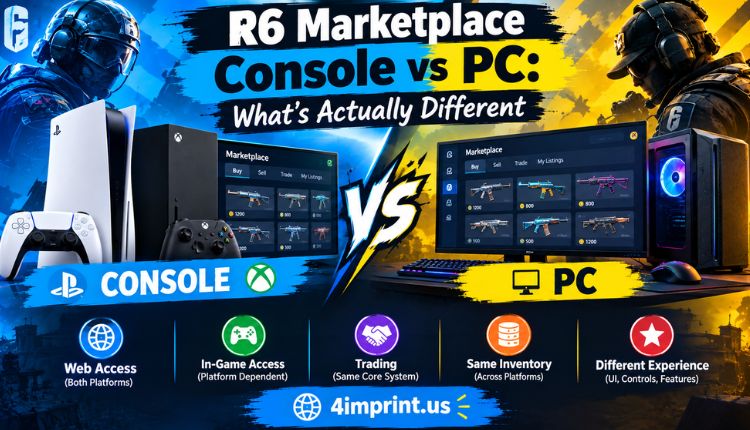
Functionally, not much. The underlying trading engine, the R6 Credits system, and the order-book matching all work identically regardless of platform. The differences are mostly about how you get there and how you input information, visit more.
| Factor | Console (Xbox/PS5) | PC |
| Access point | Ubisoft Connect via browser or in-game menu | Ubisoft Connect app or browser |
| Account sync | Instant across all linked platforms | Same |
| Item inventory | Shared, not platform-specific | Same |
| R6 Credits balance | Shared account-wide | Same |
| Typing/search experience | Slower with a controller | Faster with keyboard |
| Cross-play trading | Yes, trades aren’t limited by platform | Yes |
The practical takeaway is that nothing about your platform limits what you can buy or sell. The main friction is just navigating menus with a controller instead of a mouse, which is why a lot of console players prefer handling their marketplace activity through a phone or browser instead of squinting at text fields in-game.
How to Access R6 Marketplace on Console
When the marketplace is live, getting started on Xbox or PlayStation follows the same steps as any other platform, since everything runs through your Ubisoft account rather than console-specific software:
- Log into your Ubisoft account — either through Ubisoft Connect on your console or via a browser, since the console itself doesn’t host the marketplace directly.
- Link your Rainbow Six Siege profile if you haven’t already. This has to be done once and carries over to every device.
- Meet the eligibility requirements, which have historically included a minimum in-game level.
- Verify your email and enable two-factor authentication: This step matters more than it sounds like, especially given the account-security issues that led to the platform’s recent shutdown.
- Complete the R6 Marketplace sign up flow, which our full step-by-step guide covers screen by screen.
Once you’re set up, returning to trade is just a matter of using the R6 Marketplace login page, and your console progress and credits will already be there waiting.
Current Status: Is R6 Marketplace Console Live Right Now?
This is the part worth knowing before you go hunting for the trading screen on your console. Ubisoft’s marketplace launched in June 2025 alongside the Siege X update, but it was taken offline in late December 2025 after a security incident. As of mid-2026, it remains closed on every platform — console included — while Ubisoft works on stronger account protection and adjustments to the in-game economy. No official return date has been confirmed.
| Status Snapshot | Details |
| Available on console | Not currently — same shutdown applies to Xbox, PS5, and PC |
| Launch date | June 10, 2025 |
| Offline since | December 27, 2025 |
| Reason | Security incident affecting account safety |
| Return date | Not announced |
| Platforms affected | All — Xbox, PlayStation, PC |
Console players aren’t being treated any differently here; the whole system is paused account-wide. For a broader rundown of the timeline and what’s changed since, the R6 Marketplace beta recap is a good next read, and the Ubisoft Marketplace R6 guide explains how the relaunch is expected to work once it happens.
Security Tips for Console Players
Since your R6 Marketplace access is tied to your Ubisoft account rather than your PlayStation Network or Xbox Live login specifically, protecting that Ubisoft account is what actually matters:
- Turn on two-factor authentication before the marketplace reopens, not after.
- Use a password you haven’t reused anywhere else, including other gaming accounts.
- Ignore anyone who contacts you outside the official platform offering to “trade early” or “unlock” marketplace access — that’s not how it works, and it’s a common scam pattern.
- Check listing prices against recent trends before buying or selling once trading resumes, so you’re not badly overpaying or underselling.
- Follow official Ubisoft channels for relaunch news rather than third-party rumors, since eligibility requirements can shift between the shutdown and the eventual return.
Frequently Asked Questions
Can I use the R6 Marketplace on Xbox and PlayStation the same way as PC?
Yes. The marketplace runs through your Ubisoft account, not your console’s own storefront, so functionality is identical across platforms when it’s active.
Do I need a separate app to trade on console?
No standalone console app is required. Access typically happens through Ubisoft Connect via a browser or the in-game menu, or through the R6 Marketplace app if you prefer managing trades from your phone.
Will items I buy on Xbox show up if I switch to PS5?
Yes, as long as both consoles are linked to the same Ubisoft account. Your inventory and R6 Credits balance are shared, not platform-specific.
Is the R6 Marketplace working on console right now?
No. It’s been offline across every platform since December 27, 2025, following a security incident, and Ubisoft hasn’t confirmed a return date.
Do console players pay different fees than PC players?
No. Historically, Ubisoft applied the same small transaction fee regardless of platform, since it’s one shared trading system.
Is R6 Marketplace safe on console?
When active, the same account verification and monitoring apply to console and PC alike. The recent shutdown was about a security incident, not a platform-specific issue, and Ubisoft has said the relaunch will include stronger protections.
Conclusion
The R6 Marketplace was never designed as a PC-only feature — it’s built into your Ubisoft account, which means Xbox and PlayStation players get the exact same access, inventory, and pricing once it’s up and running.
Right now, that access is on pause for everyone while Ubisoft addresses the security issues behind December’s shutdown, but nothing about the console experience itself is different or diminished. Getting your account ready now — two-factor authentication on, password locked down, Rainbow Six Siege profile linked — means you won’t be scrambling to catch up the moment trading comes back.
For the latest on when that might happen, keep an eye on Ubisoft’s official Marketplace page, and check back here for updates as they’re confirmed.