Admin
Admin
If you play Rainbow Six Siege on console, you’ve probably wondered whether the trading boom on PC applies to you too. It does. The R6 Marketplace Xbox experience gives Xbox players the same access to buying, selling, and trading in-game cosmetics as everyone else, without needing a second platform or a workaround.
This guide walks through how the marketplace works on Xbox specifically, what’s different from PC or PlayStation, and how to get set up without running into the usual login or linking headaches.
What Is R6 Marketplace on Xbox?
R6 Marketplace is a dedicated trading platform for Rainbow Six Siege cosmetics, weapon skins, charms, uniforms, and other collectible items. On Xbox, the marketplace connects to your existing Ubisoft account, so your inventory and purchases sync the same way they would on any other platform.
This matters because Rainbow Six Siege is cross-progression across most platforms already. Your skins, charms, and Renown carry over, and the marketplace was built with that in mind. You’re not trading into a separate Xbox-only economy; you’re trading into the same pool of items every other platform draws from.
How R6 Marketplace Xbox Differs From Other Platforms
Console and PC players share the same backend, but the experience isn’t identical everywhere. Here’s a quick breakdown of what changes depending on where you play:
| Feature | Xbox | PC | PS5 |
| Account linking | Ubisoft Connect via Xbox login | Ubisoft Connect direct | Ubisoft Connect via PSN |
| Item syncing | Automatic, cross-progression | Automatic, cross-progression | Automatic, cross-progression |
| Two-factor authentication | Supported, recommended | Supported, recommended | Supported, recommended |
| Browser access for trading | Mobile browser or PC needed | Native | Mobile browser or PC needed |
| Mobile browser or PC needed | Same processing time | Same processing time | Same processing time |
The main practical difference is that Xbox players typically browse and manage listings through a phone or a separate device, since the marketplace itself runs as a website rather than an in-console app. Once your account is linked, though, everything else works the same.
Setting Up Your Account for Xbox Trading
Getting started takes a few steps, and getting them right the first time avoids most of the login problems people run into later.
- Create or confirm your Ubisoft account: Your Xbox gamertag connects to Ubisoft Connect, which is what the marketplace actually checks against.
- Complete the R6 Marketplace sign up process using the email tied to your Ubisoft account.
- Verify your email to activate trading permissions.
- Enable two-factor authentication: This is where the R6 Marketplace 2FA login setup comes in, and it’s worth doing before you list anything valuable.
- Log in and confirm your inventory shows up correctly: If your Xbox items aren’t appearing, double-check the Ubisoft link rather than the marketplace account itself; that’s usually where the disconnect happens.
Once that’s done, you can move straight to browsing listings or putting your own items up for trade.
Logging In Safely From a Console Account
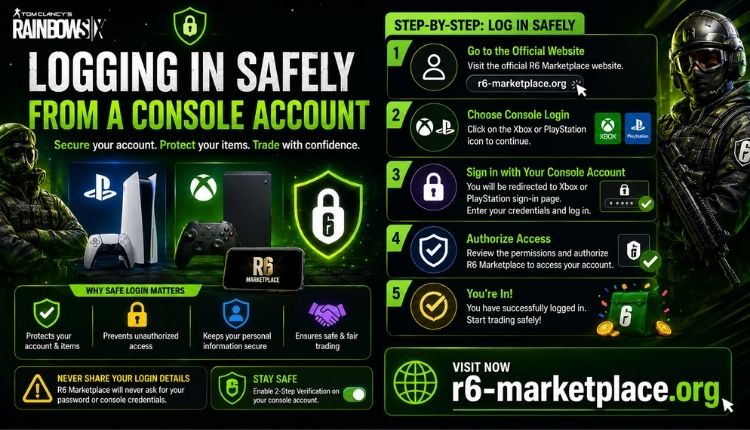
Since Xbox doesn’t run the marketplace natively, most players handle the R6 Marketplace Xbox login through a browser on their phone or a shared PC. That’s completely normal, but it does mean your login security matters more, not less, Click Here.
A few things worth doing:
- Use a password you’re not reusing elsewhere.
- Keep two-factor authentication turned on at all times.
- Avoid logging in on public or shared devices when you can help it.
- Check your account activity periodically, especially after a trade.
If you’ve used the marketplace before on a different device, the standard R6 Marketplace login page will recognize your account regardless of which platform you originally signed up from.
What You Can Trade as an Xbox Player
The item pool is identical across platforms, which is one of the more underrated parts of the system. Xbox players aren’t limited to some smaller subset of skins or excluded from anything PC players can access.
Commonly traded categories include:
- Weapon skins, including sought-after sets like the ones covered in our Black Ice price breakdown
- Operator uniforms and headgear
- Charms tied to limited events
- Bundles that no longer appear in the in-game shop
If you’re trying to figure out what something is actually worth before you buy or sell, it helps to check current R6 Marketplace skins listings rather than going off memory of old prices. Values shift with demand, and rare items especially can move a lot month to month.
Buying Items on Xbox
The buying process doesn’t change based on your platform:
- Search or filter listings for the item you want.
- Compare prices across sellers, since the same skin can be listed at different rates.
- Check the seller’s account history if that information is available.
- Confirm the purchase through the marketplace’s transaction system.
- Verify the item appears in your Xbox inventory the next time you launch the game.
That last step is the one people skip. It’s a quick way to catch a syncing issue early instead of assuming everything went through.
Selling Items on Xbox
Selling works the same way in reverse:
- Pick an item from your inventory you’re ready to part with.
- Price it against comparable listings rather than guessing.
- Post it and let it sit; overpriced items just sit there without offers.
- Accept a buyer’s offer once the price feels right.
- Confirm payment before considering the trade complete.
Patience matters more here than most people expect. Underpricing to move an item fast usually costs you more than waiting an extra day or two would have.
Security Considerations Specific to Console Trading
Because Xbox players are almost always trading through a secondary device rather than the console itself, account security deserves a bit more attention. The marketplace itself handles encryption and monitoring on its end, but your part of the equation still matters:
- Don’t share your Ubisoft credentials with third-party sites promising “faster trades.”
- Be wary of anyone asking you to complete a trade outside the marketplace’s own system.
- Re-check your linked accounts if you ever get logged out unexpectedly.
None of this is unique to Xbox, but it’s worth repeating because console players sometimes assume the platform itself adds a layer of protection. It doesn’t; the marketplace’s own security setup is what’s actually doing the work.
Frequently Asked Questions
Does R6 Marketplace work on Xbox Series X|S and Xbox One?
Yes. Since the marketplace ties to your Ubisoft account rather than the console hardware, it works the same way on both Xbox Series X|S and older Xbox One consoles.
Do I need to download an app to trade on Xbox?
No app is required. The marketplace runs through a web browser, so you can access it from your phone, a tablet, or any PC while your Xbox handles the actual gameplay.

 James William